
We have all been there. It starts with a few hours at the kitchen island, then transitions to a “productive” afternoon on the sofa, and eventually ends with you hunched over a coffee table, trying to finish a report while your lower back screams in protest. When the world shifted toward remote work, many of us treated our home setups as temporary measures—band-aids for a brief moment in time. But as the “new normal” has solidified into a permanent lifestyle, the realization has set in: our physical environment is the single biggest predictor of our professional longevity and daily energy.
Designing a home office isn’t just about finding a surface for your laptop; it’s about spatial psychology and physiological engineering. It is about creating a space that signals to your brain that it is time to perform, while ensuring your body doesn’t pay the price for your ambition. Drawing inspiration from global design leaders and ergonomic specialists, this guide will walk you through the actionable steps to transform your workspace from a makeshift corner into a high-performance sanctuary.
Spatial Logic: Finding Your “Power Spot”
Before you buy a single piece of furniture, you must find the right location. The “favorite spot” for working isn’t always the quietest room—it’s the one that balances light, temperature, and boundaries.
The Psychological Boundary. If possible, avoid working in your bedroom. Your brain associates the bedroom with melatonin and rest. When you work where you sleep, you risk two things: poor focus during the day and insomnia at night. If you live in a smaller apartment and a separate room isn’t an option, use “visual dividers.” A rug, a bookshelf, or even a different wall color can create a psychological “portal” that tells your brain, “I am now at work.”
The Light Factor. Natural light is your best friend for mood, but your worst enemy for screen glare. Position your desk perpendicular to a window. This gives you the benefits of Vitamin D and a view to rest your eyes (the 20-20-20 rule: every 20 minutes, look 20 feet away for 20 seconds) without the sun blinding you or washing out your monitor.
The Throne of Productivity: Choosing the Right Office Chair
If you spend eight hours a day working, you are spending roughly 2,000 hours a year in your chair. You likely spent more time researching your car or your mattress, yet your chair has a more direct impact on your daily pain levels.
A high-quality office chair is an investment in your musculoskeletal health. When shopping, look past the “executive” aesthetic of thick, padded leather. While these look impressive, they often trap heat and offer very little in the way of actual spinal alignment. Instead, prioritize “Active Ergonomics.”
What to Look For:
- Breathability: In many modern homes, heat retention is a major cause of restlessness. High-tensile mesh allows for airflow, keeping your core temperature stable.
- Adjustability: No two bodies are the same. Your chair should allow you to adjust the seat height, seat depth, and armrest position.
- The 90-Degree Rule: Your chair should be adjusted so that your knees are at a 90-degree angle with your feet flat on the floor. If your feet dangle, your lower back takes the strain.
The Science of the Spine: Targeted Back Support
The most common WFH injury isn’t a sudden accident; it’s “spinal creep”—the slow, structural change that happens when you slouch for months on end. This is where the distinction between a standard seat and specialized Office Chairs with Back Support becomes critical.
The S-Curve The human spine is not straight; it has a natural S-curve. When we sit in a non-ergonomic chair, that curve flattens into a C-shape. This places immense pressure on the intervertebral discs. A chair with dedicated lumbar support fills the gap between the chair and your lower back, maintaining the integrity of that S-curve.
Dynamic Movement The best chairs for back support aren’t rigid. They feature “synchro-tilt” mechanisms. This means that as you recline to take a call or think, the seat and backrest move in harmony, keeping your feet on the ground and your spine supported throughout the entire range of motion. This micro-movement keeps your muscles engaged and prevents the “stiffness” that usually sets in by 4:00 PM.
The Vertical Revolution: Why Standing Matters
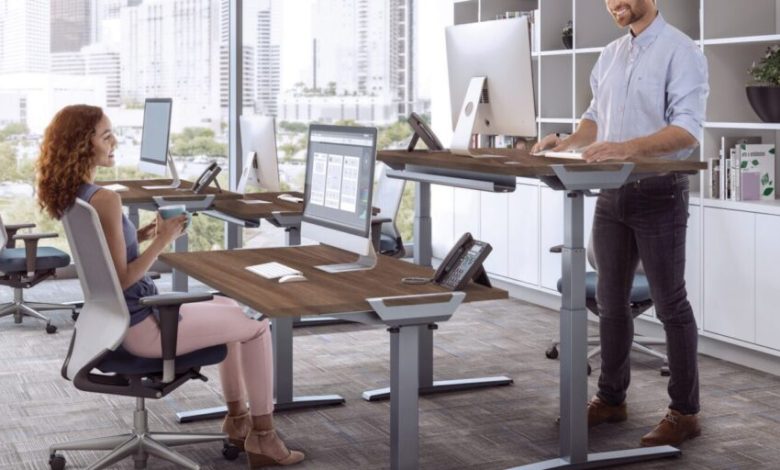
Even with the best chair in the world, the human body was not designed to be static. Research highlighted by tech and wellness blogs like Ricoh/PFU emphasizes that movement is the key to cognitive performance. This is the primary driver behind the surge in popularity of standup desks.
The Sit-Stand-Move Cycle The goal of a standing desk isn’t to stand for eight hours straight. Standing all day can lead to varicose veins and lower limb fatigue. The “magic” lies in the transition.
- The 20-8-2 Rule: Sit for 20 minutes, stand for 8 minutes, and move/stretch for 2 minutes.
- Cognitive Reset: Switching your posture changes your blood flow and oxygenation. If you find yourself stuck on a difficult problem, simply hitting the “up” button on your desk and standing for ten minutes can provide the mental “reset” you need to find a solution.
Technical Stability When choosing a standing desk, stability is paramount. Cheap manual versions often wobble when extended, which is a major distraction. Look for motorized dual-motor systems that can handle the weight of multiple monitors and offer “collision detection” to protect your other furniture.
Technical Calibration: Ergonomics Beyond the Furniture
Once you have your chair and desk, you must calibrate them. A $2,000 setup can still cause pain if it is used incorrectly.
Monitor Placement Your eyes should be level with the top third of your monitor. If you are looking down at a laptop on your desk, you are placing roughly 25 to 30 pounds of extra pressure on your neck. Use a monitor arm or a simple stack of books to bring the screen up. Your chin should be neutral, not tucked.
The Keyboard and Mouse Your elbows should be at a 90-degree angle, with your wrists floating level over the keyboard. Avoid “planting” your wrists on the desk, as this compresses the carpal tunnel. If your desk is too high and your chair cannot go higher, this is a sign that you need a footrest to bridge the gap.
Environmental Hygiene: Clutter, Sound, and Air
Your physical environment affects your “mental bandwidth.” As Ricoh’s work-from-home setup guide notes, digital and physical clutter are documented cognitive drains.
Cable Management “Cable spaghetti” is more than an eyesore; it’s a source of low-level anxiety. Use trays under your desk or simple Velcro ties to bundle your wires. A clean floor and a clean desk surface allow your eyes to rest rather than constantly processing visual noise.
Acoustic Control Noise is one of the biggest productivity killers in a home environment. While noise-canceling headphones are a great tool, you can also “soften” your room. Adding a rug, heavy curtains, or even acoustic wall panels reduces the echo in your room, making your voice sound more professional on calls and reducing the “hollow” sound that leads to ear fatigue.
Air Quality We often forget that we are biological machines. If your office is stuffy, your CO2 levels rise, and your brain slows down. Open a window for ten minutes every morning, or invest in a small air purifier and a few “office-friendly” plants like Snake Plants or Peace Lilies, which are great for oxygen production.
7. The Psychology of the “Commute”
One of the biggest benefits of an office was the commute—not the traffic, but the time it gave your brain to transition from “Parent/Partner” to “Professional.” When you work from home, you lose that buffer.
The Actionable Ritual. Create a “fake commute.” Walk around the block, make a specific cup of coffee, or spend five minutes writing a “To-Do” list before you even open your laptop. Similarly, at the end of the day, have a “shutdown ritual.” Close all your tabs, push your chair in, and physically leave the space. This prevents the “work-life bleed” that leads to burnout.
Investing for the Long Haul
It is easy to look at the price tag of a high-end ergonomic setup and hesitate. However, we must reframe how we view these costs. A high-quality chair and desk are not “expenses”—they are “preventative healthcare.”
Consider the cost of a single visit to a physical therapist or a chiropractor. Now consider the cost of a decade of chronic back pain. When you look at it through that lens, spending money on a setup that protects your spine and encourages movement is one of the most logical financial decisions you can make.
Actionable Checklist for Your Home Office Overhaul
- Audit Your Space: Is your desk perpendicular to a window? If not, move it this weekend.
- Check Your Angles: Set up your phone to record you working for ten minutes. Are you slouching? Is your monitor too low?
- The Chair Test: Sit in your current chair. Can you feel your lower back being pushed forward into its natural curve? If there is a gap, you need lumbar support.
- Manage the Wires: Spend 30 minutes this evening with some zip ties. The visual relief of a cable-free floor is immediate.
- Identify the “End”: Pick a time tonight when the laptop shuts down, and do not open it again until tomorrow.
The goal of a perfect home office isn’t just to get more work done. It’s to ensure that when the workday is over, you still have the physical and mental energy to enjoy the “home” part of your life. By combining the best in ergonomic furniture with smart environmental habits, you aren’t just working from home—you are working at your best.


